Use SIP with Twilio Voice
Learn about Twilio's Programmable Voice SIP Interface, a tool that allows you to route voice calls between your existing SIP communications infrastructure and the Twilio Cloud. This interface enables you to programmatically handle calls from the PSTN or your own PBX using TwiML or the Twilio REST API, effectively bridging your local hardware with Twilio's global reach.
You can use this guide to create inbound and outbound contact centers, build AI agents, create call tracking, provide PSTN connectivity, and create AI/ML transcriptions.
See Related reference documentation to learn more about the API resources and TwiML nouns used in this guide.
All Programmable Voice SIP guides
Before you can use SIP Interface, you must sign up for a Twilio account (if you don't already have one). To sign up for an account click here.
Connect your communications infrastructure to Twilio and start building programmable voice applications, such as call centers and IVRs, with Twilio's powerful and flexible voice capabilities. You can connect to Twilio over the public internet or alternatively via a private connection using Twilio's Interconnect. Programmable Voice SIP lets you route your voice calls with global reach to any landline phone, mobile phone, browser, mobile app, or any other SIP endpoint.
The following diagram illustrates how the Twilio Cloud can sit in-between your existing infrastructure in call flows, allowing you to build programmable voice applications. Twilio is able to programmatically handle incoming calls from the PSTN and sessions from your SIP communications infrastructure such as a PBX.
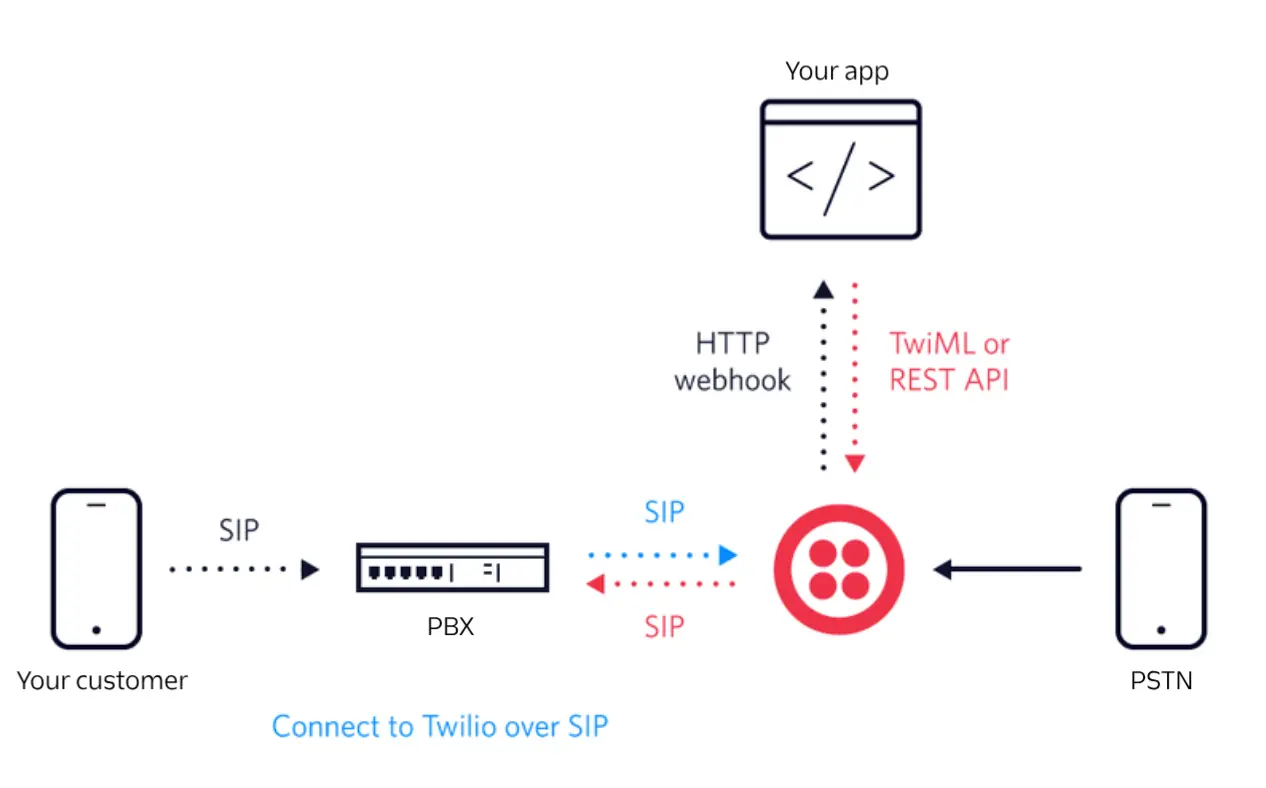
Session Initiation Protocol (SIP) is a standardized communications protocol that has been widely adopted for managing multimedia communication sessions for voice and video calls. SIP may be used to establish connectivity between your communications infrastructures such as an on-premise or virtual PBX and Twilio's communications platform.
Twilio's Programmable Voice SIP Interface product enables you to use your existing SIP communications infrastructure to initiate SIP sessions with the Twilio Cloud. When Twilio receives SIP traffic, you can configure how calls are handled using Webhooks, Twilio Functions, TwiML Bins, Studio Flows. SIP Interface uses Twilio's TwiML language and/or Twilio's REST APIs to create advanced voice applications. Learn how to get started connecting your SIP communications infrastructure to the Twilio Cloud.
Twilio's Programmable Voice SIP Interface product enables your advanced voice applications to initiate SIP sessions from the Twilio Cloud towards your existing SIP communications infrastructure using Twilio's TwiML language and/or Twilio's REST APIs. Learn how to get started connecting the Twilio Cloud to your SIP communications infrastructure.
Make sure you are aware of the following Programmable Voice SIP Domain limits.
- 100 SIP Domains per Account or Sub Account
- IP Access Control Lists (ACLs) limits
- Credential Lists limits
- SIP Registration limits
Twilio allows you to register your SIP Phones or SIP Endpoints with Twilio. SIP Registration identifies the location of the SIP Endpoints. Therefore, the user can receive calls irrespective of physical location of the SIP Endpoint.
With this feature, your SIP Endpoints can send REGISTER requests to Twilio. To learn more about how SIP registration works, see the SIP registration API.
With call transfer, you can move an active call from one endpoint to another. To move the call, SIP uses its REFER method.
Twilio supports initiating SIP REFER method from Twilio towards your IP communications infrastructure leveraging the <Refer> verb.
SIP custom header allows you to send customized headers.
UUI header allows you to send contextual information over the SIP call. You can check Sending-sip with UUI and Receiving-sip with UUI for further UUI details.
Twilio supports RFC-2833 for sending and receiving DTMF.
Twilio supports G.711 μ-law (PCMU) and A-law (PCMA) codecs for media. Carriers use these codecs most commonly, so transcoding is unnecessary.
Encryption ensures that the call signaling remains private during transmission. Transport Layer Security (TLS) provides encryption for SIP signaling.
To encrypt data, your network devices that communicate with Twilio must trust Twilio's TLS Certificate. Twilio uses certificates from a Certificate Authority (CA). To establish the authenticity of Twilio's certificate on the network might require additional root certificates.
Download Twilio's bundle of trusted CA certificates.
Note: the current bundle contains the following root certificates:
- DigiCert Global Root CA
- DigiCert Global Root G2
- DigiCert Global Root G3
When root certificates expire or the CA distrusts them, Twilio might update its CA bundle. In such cases, you receive a notice to update your SIP devices. This notification gets sent to the email address in your account.
TLS requires no further configuration and you can start sending over port 5061 straight away. TLS support via port 5061 is always active and does not require a manual toggle like Secure Media.
For calls where TLS is active this will cause SIP PCAPs downloaded from the console to be empty.
When sending TLS SIP traffic to Twilio, you will need to ensure that your infrastructure is using next-hop domain as opposed to next-hop ip. This is a common misconfiguration and will cause a 403 error that will not be visible on your Twilio account. You must send traffic to the domain {example}.sip.{edge}.twilio.com, rather than an IP address in order to associate the traffic with your Twilio account.
- Supported TLS versions:
TLSv1.2.
To comply with industry standards, Twilio doesn't support eitherTLSv1.0orTLSv1.1for Elastic SIP Trunking calls and SIP registration. - Supported Ciphers:
ECDHE-RSA-AES128-GCM-SHA256,ECDHE-RSA-AES128-SHA256,ECDHE-RSA-AES256-GCM-SHA384,ECDHE-RSA-AES256-SHA384,AES128-GCM-SHA256,AES128-SHA256,AES128-SHA,AES256-GCM-SHA384,AES256-SHA256,AES256-SHA
Info
Twilio doesn't support the sips URI scheme for encryption in flight. It does support sip URI schemes using transport=tls.
If a SIP Interface URI uses the sips scheme, Twilio replaces the scheme with sip and adds the transport=tls property on the outbound messages. Use sip and transport=tls for the URI rather than relying on Twilio adjusting the URI. This eliminates any possible error made in the adjustment.
Secure Media uses encryption to ensure that the call media and associated signaling remains private during transmission. Secure Real-Time Protocol (SRTP) provides encryption for media. For details see here.
Prepare your communications infrastructure to make sure that your SIP infrastructure has connectivity to the Twilio Cloud and vice versa. To ensure that your communications infrastructure doesn't block communication, you must update your list of allowed IP addresses. We strongly encourage you to allow all of the following IP address ranges and ports on your firewall for SIP signaling and RTP media traffic.
if you have Numbers in different regions and for availability purposes, use these IP ranges. These IP ranges allow Twilio to re-route traffic in the case of a network failure.
See Twilio's SIP IP addresses for the complete list.
A broad term to refer to IP-PBX, SBC, IP-phones, etc…
IP-phone or a soft client with which a user initiates a VoIP call
Equivalent to a SIP phone number and takes the form, sip:username@SIPDomain
It takes the form {example}.sip.{region}.twilio.com where {example} is specified by the customer and {region}is the data center where the registrar is located. Initially only us1.
This guide covers a feature that can support the following use cases:
You can use the feature in this guide to route incoming customer calls from the PSTN directly to your agents' SIP-enabled softphones or hardware IP-PBX. This allows you to use Twilio's powerful routing logic while maintaining your existing agent desktop environment.
To learn more advanced features that you can use with inbound contact centers, see Voice inbound contact center.
You can use the feature in this guide to initiate outbound calls from your internal SIP infrastructure through Twilio to the global telephone network. By connecting your dialer to Twilio via SIP, you gain access to global carrier connectivity and detailed call analytics.
To learn more advanced features that you can use with outbound contact centers, see Voice outbound call center.
You can use the feature in this guide to connect your SIP-based AI voice platforms to the PSTN. This enables your AI agents to interact with customers over standard phone lines while leveraging SIP for low-latency audio transmission between your AI engine and Twilio.
To learn more advanced features that you can use with AI agents, see AI agents.
You can use the feature in this guide to forward calls from your marketing tracking numbers to your existing SIP-based telephony system. This allows you to capture detailed call metadata in Twilio before delivering the call to your primary business infrastructure.
To learn more advanced features that you can use with call tracking, see Voice call tracking.
You can use the feature in this guide to bridge the gap between your local private branch exchange (PBX) and the public telephone network. SIP Interface allows you to send and receive calls globally without the need for traditional hardware-based T1/E1 lines.
To learn more advanced features that you can use with PSTN connectivity, see Voice PSTN connectivity.
You can use the feature in this guide to route SIP-based calls through Twilio's recording and transcription engines. This ensures that every interaction occurring over your SIP trunks can be captured and converted into text for machine learning analysis.
To learn more advanced features that you can use with AI or ML transcription, see Voice AI/ML transcription.
Explore the following guides to build on what you've learned in this guide:
- How to add programmability to your existing SIP network: Learn how to wrap your SIP calls in TwiML to add features like recording and IVRs.
- Secure media: Implement SRTP to encrypt your media streams for enhanced security.