Content Templates Overview
The Content Template Builder is a Twilio product that lets you create both templated messages and rich-content messages. It has a graphical user interface built on top of a publicly accessible API. From the Twilio Console, you can create, approve, and manage templates without writing code.
The Content Template Builder guides you through each step of template creation. The interface shows which channels a template can use and whether over-the-top (OTT) provider approval is required to unlock additional capabilities. The builder surfaces validations and suggestions as you compose a template, helping reduce approval rejections from OTT providers.
The Console displays approval statuses and important template details with color-coded status badges and labels. Templates that you create in the Content Template Builder automatically appear in the Content API, and templates that you create through the Content API automatically appear in the builder, which lets you to switch back and forth between products as needed.
As Twilio adds connectivity with new channels, Content Templates are updated to support new senders, ensuring that your templates remain compatible. The Content products also facilitate template approvals required by WhatsApp to enable outbound messaging and rich features such as dynamic call-to-action buttons. The Content API's template management features allow enterprises to manage templates across teams and enable Independent Software Vendors (ISVs) to manage templates across thousands of customer accounts.
- Build rich content across multiple channels:
- Access rich features:
- RCS: Use rich cards, carousels, and more.
- WhatsApp: Use dynamic quick replies (in session), buttons with dynamic URLs, list messages, and more.
- Facebook Messenger: Use quick replies and call-to-action (CTA) buttons.
- Develop rich messaging faster:
- Send messages to all channels using one set of data.
- Personalize content with dynamic variables that you can then substitute at runtime, for example
[name]. - Specify
Fallbackcontent types if rich content isn't available. A single Content API template can include different types of content. For instance, a template with both text and quick reply options can send quick reply buttons to WhatsApp users and switch to text for SMS users.
- Manage WhatsApp templates at scale:
- Search your templates.
- Submit eligible content to WhatsApp for approval as a template.
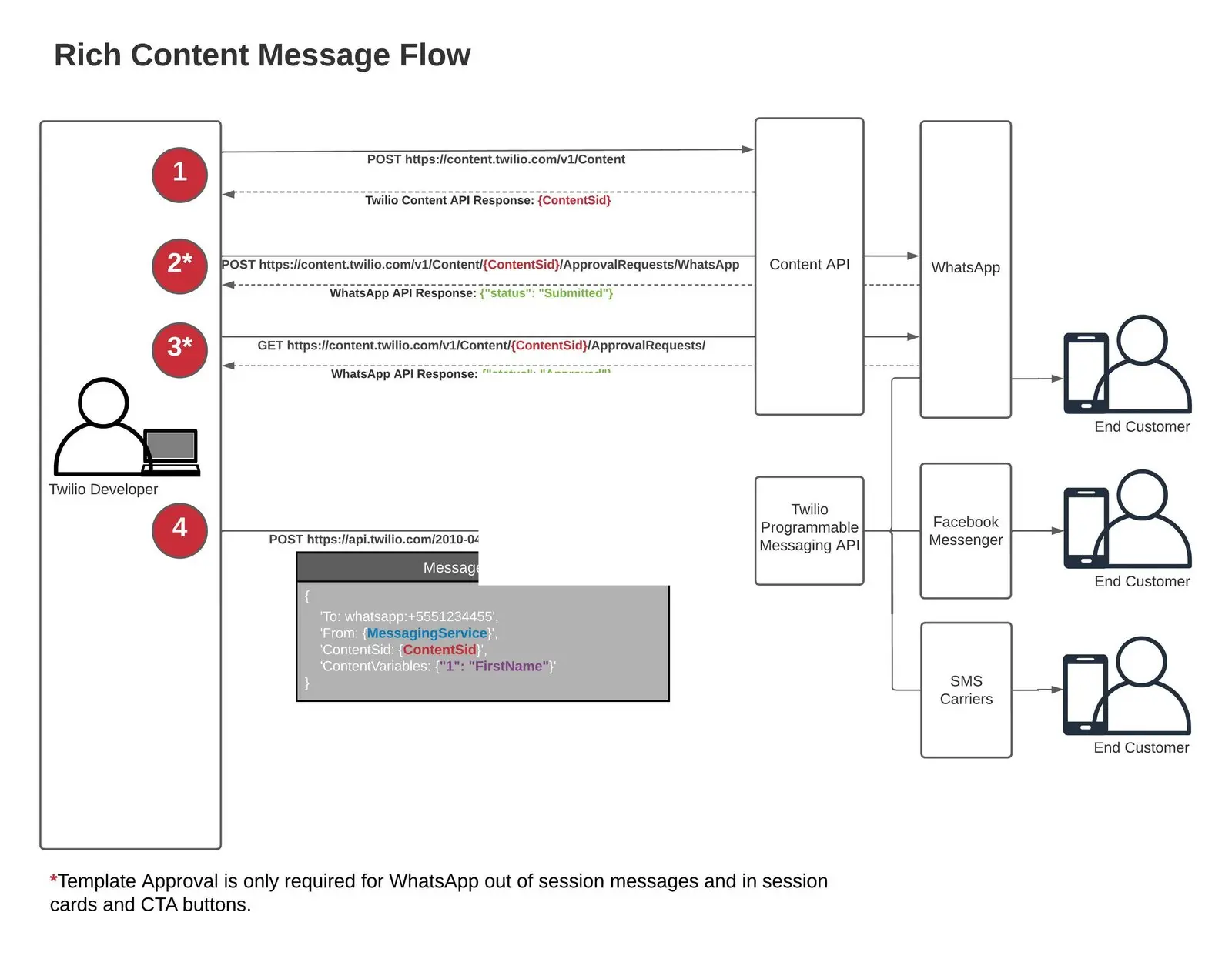
To get started, see the Content API Quickstart.
See our guide for creating templates.
To learn about the types of templates you can create in the Content Template Builder and how to send them, see the Content Template Builder Reference section.