twilio/flows
With WhatsApp Flows, you create an in-app, multi-screen experience that a user receives and submits all within WhatsApp.
A business sends a Flow as part of an approved Content Template. The templated message contains a button to open the attached Flow in the WhatsApp UI. Within the Flow, you can include text, images, and several input components. End users respond with single-choice, multi-choice, toggle, short-text, long-text, and date-picker inputs. You can organize these components across up to 10 screens.
Flow Variable limitations
Variable names within pages can't have periods in them.
The twilio/flows Content Template type works well for Flows that don't need complex inputs across multiple screens or endpoint features. You can create twilio/flows in the Content Template Builder or the Content API. Compare with whatsapp/flows that require creating the Flow in the WhatsApp Business Account before sending with the Twilio Content API.
Flows limitations
Flows aren't designed to transmit HIPAA Eligible Service or PCI data. Don't use them in workflows that require HIPAA or PCI compliance.
If you need to transmit sensitive information, use Message Redaction. Message Redaction isn't compatible with Studio, Proxy Service, or Functions. Don't send Flows that contain sensitive information through these products or services.
- Send a multi-screen form that includes several questions.
- Collect text input, selections, and picker answers.
- Include images, links, and clarifying text on each screen.
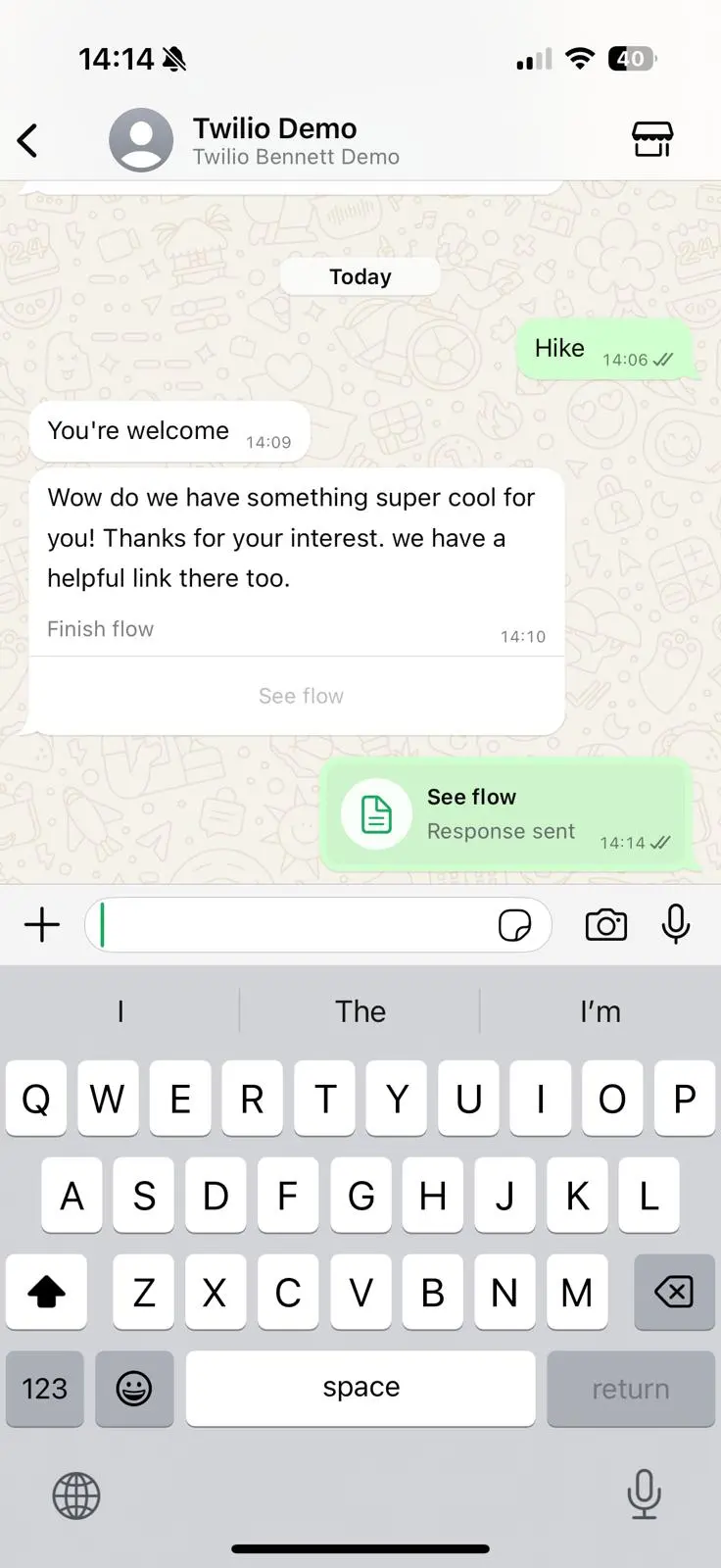 | 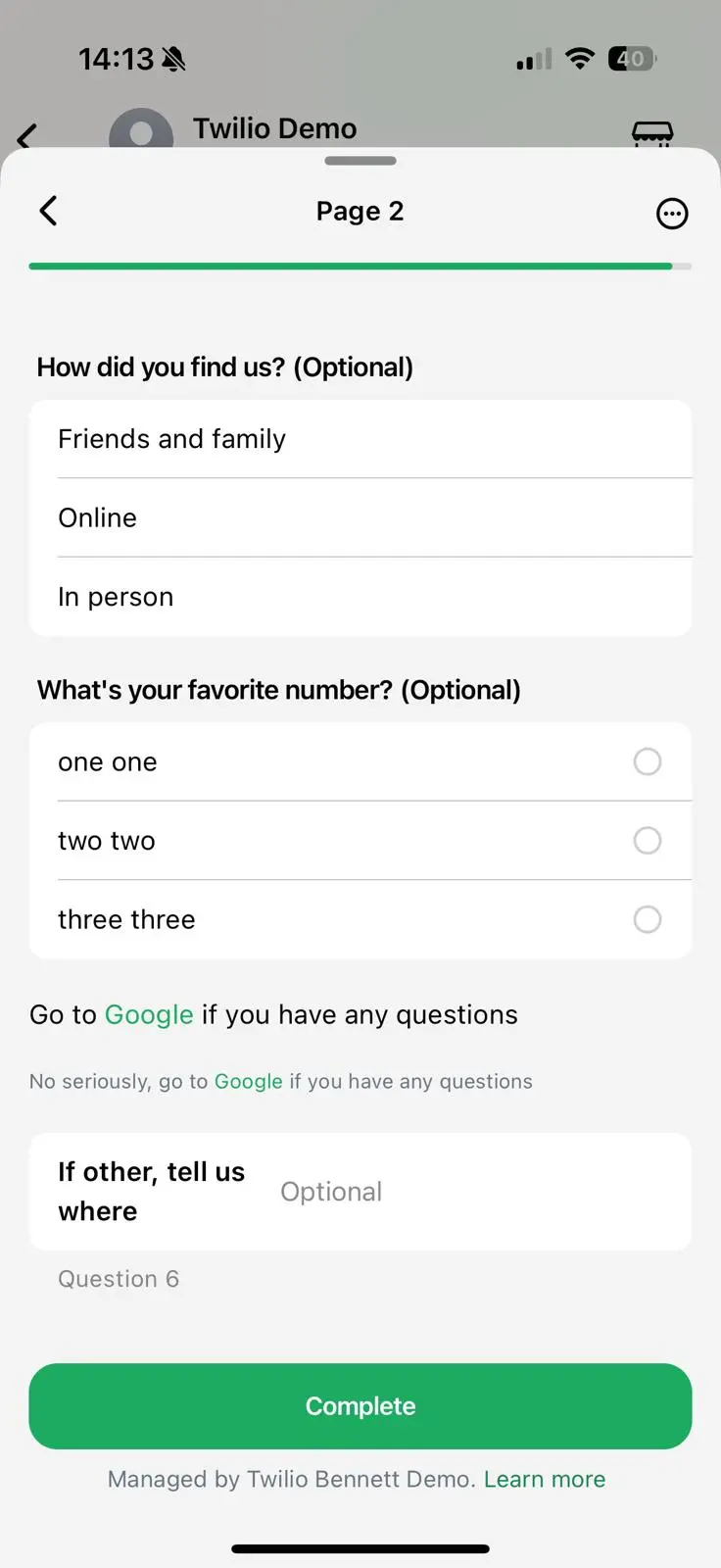 |
|---|
To create a Flow in the Content Template Builder:
- Create a
twilio/flowsContent Template. - Submit the content template for approval. Choose the appropriate category (
UTILITYorMARKETING). - When you submit the
twilio/flowsContent Template, Meta publishes the Flow in your WhatsApp Business Account. You can view the publishing status in the Content Template approvals list. You can't use Flows without an approved content template.
| Parameter | Type | Required | Variable support | Description |
|---|---|---|---|---|
body | string | Yes | Yes | Text of the templated message that delivers the Flow. Maximum length: 1,024 characters |
subtitle | string | No | No | Footer of the message. Maximum length: 1,024 characters |
media_url | string | No | Yes | Media on the initial Flow message. Supports .png, .jpeg, .mp4, and .pdf. The domain must be static; the path can be variable. |
type | enum | Yes | No | Flow category. Valid values: SIGN_UP, SIGN_IN, APPOINTMENT_BOOKING, LEAD_GENERATION, CONTACT_US, CUSTOMER_SUPPORT, SURVEY, OTHER |
button_text | string | Yes | No | Text displayed on the button that starts the Flow. |
pages | array | Yes | No | Definitions of each page's components. Maximum: 10 pages. |
| Property | Type | Required | Variable support | Description |
|---|---|---|---|---|
id | string | Yes | No | Identifier returned in the webhook. Maximum length: 20 characters |
title | string | No | No | Title text that appears above the Flow page. |
subtitle | string | No | No | Subtitle text that appears at the top of the Flow page. |
layout | array | Yes | No | Components shown on the page. Each component must be one of the following: SHORT_TEXT,LONG_TEXT,SINGLE_SELECT,MULTI_SELECT,DATE_PICKER,LIST,TEXT_HEADING,TEXT_SUBHEADING,TEXT_CAPTION,TEXT_BODY,RICH_TEXT,MEDIA,FOOTER |
SHORT_TEXT object
| Property | Required | Type | Variable support | Description |
|---|---|---|---|---|
type | Yes | enum | No | Must be SHORT_TEXT. |
text | Yes | string | Yes (entire string must be variable or static) | Helper text. |
label | Yes | string | Yes (entire string must be variable or static) | Question displayed to the user. |
required | No | Boolean | No | Defaults to false. Whether the user must answer the question. |
input_type | No | enum | No | Defaults to TEXT. Valid values: TEXT, NUMBER, EMAIL, PASSWORD, PASSCODE, PHONE. |
LONG_TEXT object
| Property | Required | Type | Variable support | Description |
|---|---|---|---|---|
type | Yes | enum | No | Must be LONG_TEXT. |
text | Yes | string | Yes (entire string must be variable or static) | Helper text. |
label | Yes | string | Yes (entire string must be variable or static) | Question displayed to the user. |
required | No | Boolean | No | Defaults to false. Whether the user must answer the question. |
SINGLE_SELECT object
| Property | Required | Type | Variable support | Description |
|---|---|---|---|---|
type | Yes | enum | No | Must be SINGLE_SELECT. |
text | Yes | string | Yes (entire string must be variable or static) | Helper text. |
label | Yes | string | Yes (entire string must be variable or static) | Question displayed to the user. |
options | Yes | string | Yes (entire string must be variable or static) | Stringified array that contains title and id pairs. If you use a variable, the variable must replace the entire string. Example: "[{\"id\":\"ff\",\"title\":\"Friends and family\"}]" |
options.title | Yes | string | Yes | Display title for the option. Can be a variable. |
options.id | Yes | string | Yes | Option identifier returned in the webhook. Can be a variable. |
MULTI_SELECT object
| Property | Required | Type | Variable support | Description |
|---|---|---|---|---|
type | Yes | enum | No | Must be MULTI_SELECT. |
text | Yes | string | Yes (entire string must be variable or static) | Helper text. |
label | Yes | string | Yes (entire string must be variable or static) | Question displayed to the user. |
options | Yes | string | Yes (entire string must be variable or static) | Stringified array that contains title and id pairs. If you use a variable, the variable must replace the entire string. Example: "[{\"id\":\"ff\",\"title\":\"Friends and family\"}]" |
options.title | Yes | string | Yes | Display title for the option. Can be a variable. |
options.id | Yes | string | Yes | Option identifier returned in the webhook. Can be a variable. |
DATE_PICKER object
| Property | Required | Type | Variable support | Description |
|---|---|---|---|---|
type | Yes | enum | No | Must be DATE_PICKER. |
label | Yes | string | Yes (entire string must be variable or static) | Question displayed to the user. |
min_date | Yes | string | Yes (entire string must be variable or static) | Start date in YYYY-MM-DD format. |
max_date | Yes | string | Yes (entire string must be variable or static) | End date in YYYY-MM-DD format. |
unavailable_dates | Yes | string | Yes (entire string must be variable or static) | Stringified array of unavailable dates in YYYY-MM-DD format. |
name | No | string | Yes (entire string must be variable or static) | Name of the date picker object. |
LIST object
| Property | Required | Type | Variable support | Description |
|---|---|---|---|---|
type | Yes | enum | No | Must be LIST. |
label | Yes | string | Yes (entire string must be variable or static) | Question displayed to the user. |
options | Yes | string | Yes (entire string must be variable or static) | Stringified array that contains title and id pairs. If you use a variable, the variable must replace the entire string. Example: "[{\"id\":\"ff\",\"title\":\"Friends and family\"}]" |
options.title | Yes | string | Yes | Display title for the option. Can be a variable. |
options.id | Yes | string | Yes | Option identifier returned in the webhook. Can be a variable. |
TEXT_HEADING object
| Property | Required | Type | Variable support | Description |
|---|---|---|---|---|
type | Yes | enum | No | Must be TEXT_HEADING. |
text | Yes | string | Yes (entire string must be variable or static) | Markdown-formatted text. Supports the syntax described in the WhatsApp Components syntax cheat sheet. |
TEXT_SUBHEADING object
| Property | Required | Type | Variable support | Description |
|---|---|---|---|---|
type | Yes | enum | No | Must be TEXT_SUBHEADING. |
text | Yes | string | Yes (entire string must be variable or static) | Markdown-formatted text. Supports the syntax described in the WhatsApp Components syntax cheat sheet. |
TEXT_BODY object
| Property | Required | Type | Variable support | Description |
|---|---|---|---|---|
type | Yes | enum | No | Must be TEXT_BODY. |
text | Yes | string | Yes (entire string must be variable or static) | Markdown-formatted text. Supports the syntax described in the WhatsApp Components syntax cheat sheet. |
TEXT_CAPTION object
| Property | Required | Type | Variable support | Description |
|---|---|---|---|---|
type | Yes | enum | No | Must be TEXT_CAPTION. |
text | Yes | string | Yes (entire string must be variable or static) | Markdown-formatted text. Supports the syntax described in the WhatsApp Components syntax cheat sheet. |
RICH_TEXT object
| Property | Required | Type | Variable support | Description |
|---|---|---|---|---|
type | Yes | enum | No | Must be RICH_TEXT. |
text_list | Yes | array | Yes (entire string must be variable or static) | Array of Markdown-formatted strings. Supports the syntax described in the WhatsApp Components syntax cheat sheet. |
MEDIA object
| Property | Required | Type | Variable support | Description |
|---|---|---|---|---|
type | Yes | enum | No | Must be MEDIA. |
url | Yes | string | Yes | Image URL. Supports .jpeg and .png formats. |
FOOTER object
| Property | Required | Type | Variable support | Description |
|---|---|---|---|---|
type | Yes | enum | No | Must be FOOTER. |
label | Yes | string | Yes | Text displayed in the button used to continue the Flow. |
1curl -X POST 'https://content.twilio.com/v1/Content' \2-H 'Content-Type: application/json' \3-u $TWILIO_ACCOUNT_SID:$TWILIO_AUTH_TOKEN \4-d '{5"friendly_name": "info_flow",6"language": "en",7"types": {8"twilio/flows": {9"body": "Wow do we have something super cool for you! Thanks for your interest. we have a helpful link there too.",10"button_text": "See flow",11"subtitle": "Finish flow",12"pages": [13{14"id": "id_one",15"next_page_id": "id_two",16"title": "Page 1",17"layout": [18{19"label": "Name",20"type": "SHORT_TEXT",21"text": "Question 1",22"required": true23},24{25"label": "Email",26"type": "SHORT_TEXT",27"text": "Question 2",28"input_type": "EMAIL"29},30{31"label": "Address",32"type": "LONG_TEXT",33"text": "Question 3"34}35]36},37{38"id": "id_two",39"next_page_id": null,40"title": "Page 2",41"subtitle": "Subtitle of Page 2",42"layout": [43{44"label": "How did you find us?",45"type": "SINGLE_SELECT",46"options": "[{\"id\":\"ff\",\"title\":\"Friends and family\"},{\"id\":\"oo\",\"title\":\"Online\"},{\"id\":\"ip\",\"title\":\"In person\"}]"47},48{49"label": "What is your favorite number?",50"type": "MULTIPLE_SELECT",51"options": "[{\"id\":\"one\",\"title\":\"one one\"},{\"id\":\"two\",\"title\":\"two two\"},{\"id\":\"three\",\"title\":\"three three\"}]"52},53{54"type": "TEXT_BODY",55"text": "Go to [Google](https://www.google.com/) if you have any questions"56},57{58"type": "TEXT_CAPTION",59"text": "No seriously, go to [Google](https://www.google.com/) if you have any questions"60},61{62"label": "If other, tell us where",63"type": "SHORT_TEXT",64"text": "Question 6"65}66]67}68],69"type": "OTHER"70}71}72}'
Output
1{2"account_sid": "ACXXXXXXXXXXXXX",3"date_created": "2025-01-22T22:35:25Z",4"date_updated": "2025-01-22T22:35:25Z",5"friendly_name": "info_flow",6"language": "en",7"links": {8"approval_create": "https://content.twilio.com/v1/Content/HXXXXXXXXXXXX/ApprovalRequests/whatsapp",9"approval_fetch": "https://content.twilio.com/v1/Content/HXXXXXXXXXXXX/ApprovalRequests"10},11"sid": "HXXXXXXXXXXXX",12"types": {13"twilio/flows": {14"body": "Wow do we have something super cool for you! Thanks for your interest. we have a helpful link there too.",15"button_text": "See flow",16"media_url": null,17"pages": [18{19"id": "id_one",20"layout": [21{22"input_type": "TEXT",23"label": "Name",24"name": null,25"required": true,26"text": "Question 1",27"type": "SHORT_TEXT"28},29{30"input_type": "EMAIL",31"label": "Email",32"name": null,33"required": null,34"text": "Question 2",35"type": "SHORT_TEXT"36},37{38"input_type": null,39"label": "Address",40"name": null,41"required": null,42"text": "Question 3",43"type": "LONG_TEXT"44}45],46"next_page_id": "id_two",47"subtitle": null,48"title": "Page 1"49},50{51"id": "id_two",52"layout": [53{54"label": "How did you find us?",55"name": null,56"options": "[{\"id\":\"ff\",\"title\":\"Friends and family\"},{\"id\":\"oo\",\"title\":\"Online\"},{\"id\":\"ip\",\"title\":\"In person\"}]",57"required": null,58"type": "SINGLE_SELECT"59},60{61"label": "What's your favorite number?",62"name": null,63"options": "[{\"id\":\"one\",\"title\":\"one one\"},{\"id\":\"two\",\"title\":\"two two\"},{\"id\":\"three\",\"title\":\"three three\"}]",64"required": null,65"type": "MULTIPLE_SELECT"66},67{68"text": "Go to [Google](https://www.google.com/) if you have any questions",69"type": "TEXT_BODY"70},71{72"text": "No seriously, go to [Google](https://www.google.com/) if you have any questions",73"type": "TEXT_CAPTION"74},75{76"input_type": "TEXT",77"label": "If other, tell us where",78"name": null,79"required": null,80"text": "Question 6",81"type": "SHORT_TEXT"82}83],84"next_page_id": null,85"subtitle": "Subtitle of Page 2",86"title": "Page 2"87}88],89"subtitle": "Finish flow",90"type": "OTHER"91}92},93"url": "https://content.twilio.com/v1/Content/HXXXXXXXXXXXX",94"variables": {}95}
You can check the status of a Content Template submitted for WhatsApp approval:
1// Download the helper library from https://www.twilio.com/docs/node/install2const twilio = require("twilio"); // Or, for ESM: import twilio from "twilio";34// Find your Account SID at twilio.com/console5// Provision API Keys at twilio.com/console/runtime/api-keys6// and set the environment variables. See http://twil.io/secure7// For local testing, you can use your Account SID and Auth token8const accountSid = process.env.TWILIO_ACCOUNT_SID;9const apiKey = process.env.TWILIO_API_KEY;10const apiSecret = process.env.TWILIO_API_SECRET;11const client = twilio(apiKey, apiSecret, { accountSid: accountSid });1213async function listContentAndApprovals() {14const contentAndApprovals = await client.content.v1.contentAndApprovals.list({15limit: 20,16});1718contentAndApprovals.forEach((c) => console.log(c.dateCreated));19}2021listContentAndApprovals();
Response
1{2"contents": [],3"meta": {4"page": 0,5"page_size": 10,6"first_page_url": "https://content.twilio.com/v1/ContentAndApprovals?PageSize=10&Page=0",7"previous_page_url": null,8"next_page_url": null,9"url": "https://content.twilio.com/v1/ContentAndApprovals?PageSize=10&Page=0",10"key": "contents"11}12}
Sending a twilio/flows Content Template is the same process as sending other Content Templates using the Programmable Messaging APIs. For detailed steps, see Send templates created with the Content Template Builder.
1// Download the helper library from https://www.twilio.com/docs/node/install2const twilio = require("twilio"); // Or, for ESM: import twilio from "twilio";34// Find your Account SID at twilio.com/console5// Provision API Keys at twilio.com/console/runtime/api-keys6// and set the environment variables. See http://twil.io/secure7// For local testing, you can use your Account SID and Auth token8const accountSid = process.env.TWILIO_ACCOUNT_SID;9const apiKey = process.env.TWILIO_API_KEY;10const apiSecret = process.env.TWILIO_API_SECRET;11const client = twilio(apiKey, apiSecret, { accountSid: accountSid });1213async function createMessage() {14const message = await client.messages.create({15contentSid: "HXaaaaaaaaaaaaaaaaaaaaaaaaaaaaaaaa",16from: "whatsapp:+14155238886",17to: "whatsapp:+15017122661",18});1920console.log(message.sid);21}2223createMessage();
Response
1{2"account_sid": "ACaaaaaaaaaaaaaaaaaaaaaaaaaaaaaaaa",3"api_version": "2010-04-01",4"body": "Hello! 👍",5"date_created": "Thu, 24 Aug 2023 05:01:45 +0000",6"date_sent": "Thu, 24 Aug 2023 05:01:45 +0000",7"date_updated": "Thu, 24 Aug 2023 05:01:45 +0000",8"direction": "outbound-api",9"error_code": null,10"error_message": null,11"from": "whatsapp:+14155238886",12"num_media": "0",13"num_segments": "1",14"price": null,15"price_unit": null,16"messaging_service_sid": "MGaaaaaaaaaaaaaaaaaaaaaaaaaaaaaaaa",17"sid": "SMaaaaaaaaaaaaaaaaaaaaaaaaaaaaaaaa",18"status": "queued",19"subresource_uris": {20"media": "/2010-04-01/Accounts/ACaaaaaaaaaaaaaaaaaaaaaaaaaaaaaaaa/Messages/SMaaaaaaaaaaaaaaaaaaaaaaaaaaaaaaaa/Media.json"21},22"to": "whatsapp:+15017122661",23"uri": "/2010-04-01/Accounts/ACaaaaaaaaaaaaaaaaaaaaaaaaaaaaaaaa/Messages/SMaaaaaaaaaaaaaaaaaaaaaaaaaaaaaaaa.json"24}
When a user submits a Flow in WhatsApp, Twilio sends a webhook request to the messaging endpoint that you've configured on your WhatsApp sender. The InteractiveData field contains the names and user-submitted values for the Flow's structured data components.
You can also prepare a follow-up experience for the user, such as a message to indicate that you have received the completed flow.
| Field | Description |
|---|---|
FlowData | Raw data string from the channel provider. |
InteractiveData | User-provided information in JSON format. |