IVR: Phone Tree with Java and Servlets
Learn to create an interactive voice response (IVR) system with Twilio Programmable Voice and your Java web application by using the <Gather>, <Say>, and <Dial> TwiML elements to handle phone tree logic inside an application. You can use this guide to send notifications, create self-service automation, build inbound call centers, build outbound call centers, or implement AI or ML transcription.
See Related reference documentation to learn more about the TwiML voice elements used in this guide.

This Servlets sample application is modeled after a typical call center experience.
Stranded aliens can call a phone number and receive instructions on how to get out of earth safely, or call their home planet directly. In this tutorial, we'll show you the key bits of code to make this work.
To run this sample app yourself, download the code and follow the instructions on GitHub.
Read how Livestream and others built phone trees on IVR with Twilio. Find examples for many web frameworks and languages on our IVR application page.
To initiate the phone tree, we need to configure one of our Twilio numbers to send our web application an HTTP request when we get an incoming call.
Click on one of your numbers and configure the Voice URL to point to our app. In our code the route will be /ivr/welcome.
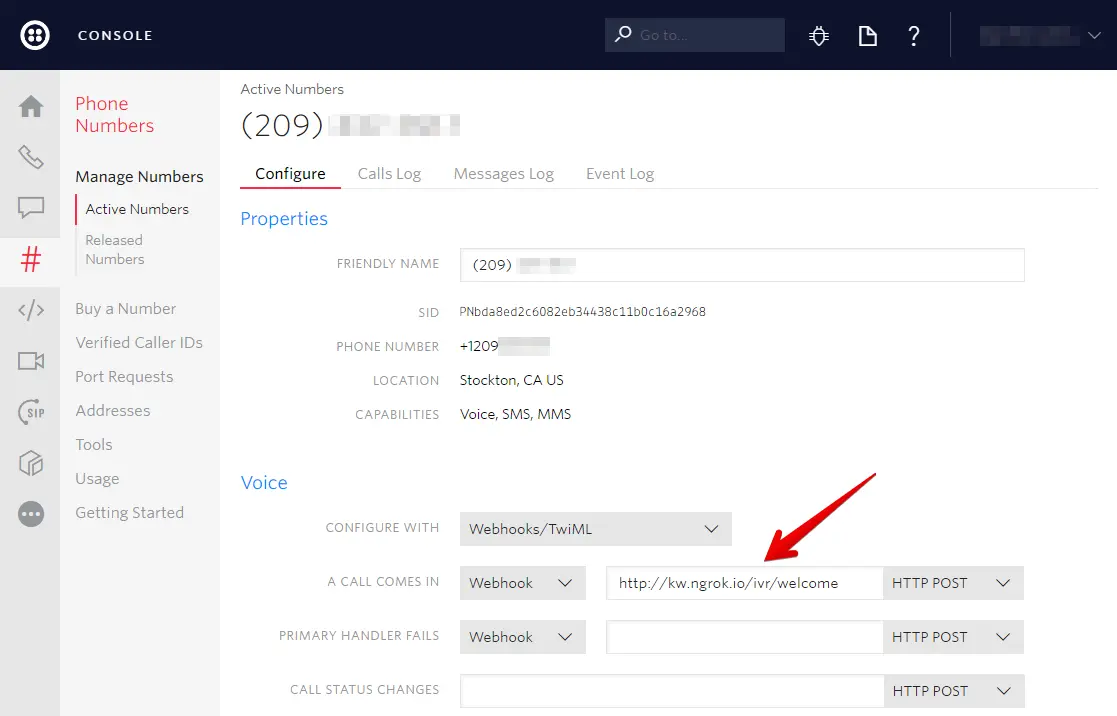
If you don't already have a server configured to use as your webhook, ngrok is a great tool for testing webhooks locally.
With our Twilio number configured, we are prepared to respond to the Twilio request.
Our Twilio number is now configured to send HTTP requests to this controller action on any incoming voice calls. Our app responds with TwiML to tell Twilio what to do in response to the message.
In this case we tell Twilio to Gather the input from the caller and Play a welcome message.
src/main/java/com/twilio/phonetree/servlet/ivr/WelcomeServlet.java
1package com.twilio.phonetree.servlet.ivr;23import com.twilio.twiml.TwiMLException;4import com.twilio.twiml.VoiceResponse;5import com.twilio.twiml.voice.Gather;6import com.twilio.twiml.voice.Play;78import javax.servlet.http.HttpServlet;9import javax.servlet.http.HttpServletRequest;10import javax.servlet.http.HttpServletResponse;11import java.io.IOException;1213public class WelcomeServlet extends HttpServlet {1415@Override16protected void doPost(HttpServletRequest servletRequest, HttpServletResponse servletResponse)17throws IOException {18String mp3file = "https://raw.githubusercontent.com/TwilioDevEd/"19+ "ivr-phone-tree-servlets/master/et-phone.mp3";20VoiceResponse response = new VoiceResponse.Builder()21.gather(new Gather.Builder()22.action("/menu/show")23.numDigits(1)24.build())25.play(new Play.Builder(mp3file)26.loop(3)27.build())28.build();2930servletResponse.setContentType("text/xml");31try {32servletResponse.getWriter().write(response.toXml());33} catch (TwiMLException e) {34throw new RuntimeException(e);35}36}37}
After playing the audio and retrieving the caller's input, Twilio will send this input to our application.
The gather's action parameter takes an absolute or relative URL as a value. In our case, this is the /menu/show route.
When the caller has finished entering digits, Twilio will make a GET or POST request to this URL that includes a Digits parameter with the number our caller chose.
After making this request, Twilio will continue the current call using the TwiML received in your response. Any TwiML verbs occurring after a <Gather> are unreachable, unless the caller enters no digits.
src/main/java/com/twilio/phonetree/servlet/ivr/WelcomeServlet.java
1package com.twilio.phonetree.servlet.ivr;23import com.twilio.twiml.TwiMLException;4import com.twilio.twiml.VoiceResponse;5import com.twilio.twiml.voice.Gather;6import com.twilio.twiml.voice.Play;78import javax.servlet.http.HttpServlet;9import javax.servlet.http.HttpServletRequest;10import javax.servlet.http.HttpServletResponse;11import java.io.IOException;1213public class WelcomeServlet extends HttpServlet {1415@Override16protected void doPost(HttpServletRequest servletRequest, HttpServletResponse servletResponse)17throws IOException {18String mp3file = "https://raw.githubusercontent.com/TwilioDevEd/"19+ "ivr-phone-tree-servlets/master/et-phone.mp3";20VoiceResponse response = new VoiceResponse.Builder()21.gather(new Gather.Builder()22.action("/menu/show")23.numDigits(1)24.build())25.play(new Play.Builder(mp3file)26.loop(3)27.build())28.build();2930servletResponse.setContentType("text/xml");31try {32servletResponse.getWriter().write(response.toXml());33} catch (TwiMLException e) {34throw new RuntimeException(e);35}36}37}
Now that we have told Twilio where to send the caller's input, we can look at how to process that input.
If our callers choose to call their home planet, we will read them the planet directory. This is similar to a typical "company directory" feature of most IVRs.
In our TwiML response we again use a Gather verb to collect our caller's input. This time, the action verb points to the planets route, which will switch our response based on what the caller chooses.
src/main/java/com/twilio/phonetree/servlet/menu/ShowServlet.java
1package com.twilio.phonetree.servlet.menu;234import com.twilio.twiml.TwiMLException;5import com.twilio.twiml.VoiceResponse;6import com.twilio.twiml.voice.Gather;7import com.twilio.twiml.voice.Hangup;8import com.twilio.twiml.voice.Say;910import javax.servlet.http.HttpServlet;11import javax.servlet.http.HttpServletRequest;12import javax.servlet.http.HttpServletResponse;13import java.io.IOException;1415public class ShowServlet extends HttpServlet {1617@Override18protected void doPost(HttpServletRequest servletRequest, HttpServletResponse servletResponse)19throws IOException {2021String selectedOption = servletRequest.getParameter("Digits");2223VoiceResponse response;24switch (selectedOption) {25case "1":26response = getReturnInstructions();27break;28case "2":29response = getPlanets();30break;31default:32response = com.twilio.phonetree.servlet.common.Redirect.toMainMenu();33}3435servletResponse.setContentType("text/xml");36try {37servletResponse.getWriter().write(response.toXml());38} catch (TwiMLException e) {39throw new RuntimeException(e);40}41}4243private VoiceResponse getReturnInstructions() {4445VoiceResponse response = new VoiceResponse.Builder()46.say(new Say.Builder(47"To get to your extraction point, get on your bike and go down "48+ "the street. Then Left down an alley. Avoid the police cars. Turn left "49+ "into an unfinished housing development. Fly over the roadblock. Go "50+ "passed the moon. Soon after you will see your mother ship.")51.voice(Say.Voice.POLLY_AMY)52.language(Say.Language.EN_GB)53.build())54.say(new Say.Builder(55"Thank you for calling the ET Phone Home Service - the "56+ "adventurous alien's first choice in intergalactic travel")57.build())58.hangup(new Hangup.Builder().build())59.build();6061return response;62}6364private VoiceResponse getPlanets() {6566VoiceResponse response = new VoiceResponse.Builder()67.gather(new Gather.Builder()68.action("/commuter/connect")69.numDigits(1)70.build())71.say(new Say.Builder(72"To call the planet Broh doe As O G, press 2. To call the planet "73+ "DuhGo bah, press 3. To call an oober asteroid to your location"74+ ", press 4. To go back to the main menu, press the star key ")75.voice(Say.Voice.POLLY_AMY)76.language(Say.Language.EN_GB)77.loop(3)78.build()79).build();8081return response;82}83}84
Again we show some options to the caller and instruct Twilio to collect the caller's choice.
In this servlet, we grab the caller's selection from the request and store it in a variable called selectedOption. We then use a Dial verb with the appropriate phone number to connect our caller to the correct home planet.
The current numbers are hard coded, but they could also be read from a database or from a file.
src/main/java/com/twilio/phonetree/servlet/commuter/ConnectServlet.java
1package com.twilio.phonetree.servlet.commuter;23import com.twilio.phonetree.servlet.common.Redirect;4import com.twilio.twiml.voice.Dial;5import com.twilio.twiml.voice.Number;6import com.twilio.twiml.TwiMLException;7import com.twilio.twiml.VoiceResponse;89import javax.servlet.http.HttpServlet;10import javax.servlet.http.HttpServletRequest;11import javax.servlet.http.HttpServletResponse;12import java.io.IOException;13import java.util.HashMap;14import java.util.Map;1516public class ConnectServlet extends HttpServlet {1718@Override19protected void doPost(HttpServletRequest servletRequest, HttpServletResponse servletResponse)20throws IOException {2122String selectedOption = servletRequest.getParameter("Digits");23Map<String, String> optionPhones = new HashMap<>();24optionPhones.put("2", "+19295566487");25optionPhones.put("3", "+17262043675");26optionPhones.put("4", "+16513582243");2728VoiceResponse twiMLResponse = optionPhones.containsKey(selectedOption)29? dial(optionPhones.get(selectedOption))30: Redirect.toMainMenu();3132servletResponse.setContentType("text/xml");33try {34servletResponse.getWriter().write(twiMLResponse.toXml());35} catch (TwiMLException e) {36throw new RuntimeException(e);37}38}3940private VoiceResponse dial(String phoneNumber) {41Number number = new Number.Builder(phoneNumber).build();42return new VoiceResponse.Builder()43.dial(new Dial.Builder().number(number).build())44.build();45}46}47
See use cases for IVRs with Twilio Programmable Voice to learn about the different applications you can build with IVR phone trees.
After following this guide, you can successfully process incoming voice calls and present an interactive menu using Twilio Programmable Voice in your application. You will have a live IVR system capable of listening to dual-tone multi-frequency (DTMF) keypad inputs, executing logic conditionally based on user choice, and dynamically forwarding or terminating calls based on your response payload.
Explore the following guides to build on what you've learned in this guide:
- Respond to incoming phone calls: Learn how to handle incoming webhooks from Twilio to dynamically direct callers.
- Collect payments during calls: Use the
<Pay>TwiML verb to securely collect payment information from callers. - Make outbound phone calls: Initiate phone calls programmatically from your Node.js application.